

The method used will help keep the file references between the two versions apart.
Popular Posts
-
 Disney cars Disney Cars Saly Filmore Disney Cars coloring pages wallpaper Lightning Mcqueen Ramone disney cars poster
 -
 2013 Cars Model, 2013 car, photo mercedes, car dekho, car electric, new cars, new vehicle, cost of cars...
 -
 Red And Black Ferrari Car Red Ferrari Car Wallpaper Yellow Ferrari Car Picture Latest Model Ferrari Car Pink Ferrari Car Wallpaper
Showing posts with label installation manager. Show all posts
Showing posts with label installation manager. Show all posts
Tuesday, January 10, 2012
How to install Multiple SolidWorks versions on one Computer
The method used will help keep the file references between the two versions apart.

Sunday, March 6, 2011
How to uninstall SolidWorks 2011 cleanly
When upgrading a major version of SolidWorks, we recommend uninstalling previous SolidWorks versions to ensure there are no conflicts. SolidWorks uses the Windows registry to store settings and other information, and these registry entries should also be removed after uninstalling. SolidWorks automatically regenerates any necessary registry entries, using default values, when the program is opened.
As of SolidWorks 2011, there is an option in the Installation Manager (IM) to cleanly uninstall SolidWorks, which has been one of the most popular Enhancement Requests in recent years.
Before you begin, make sure you have transferred your license off the computer!
In XP:
Start Menu >> Control Panel >> Add/Remove Programs >> RMB on SolidWorks 2011>> Uninstall
In Vista/Win7
Start Menu >> Control Panel >> Programs and Features >> RMB SolidWorks 2011>> Uninstall
Once the SolidWorks IM has started, RMB on the Title Bar >> select Total Uninstall
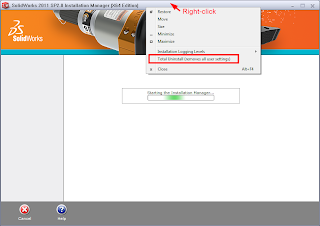
Then proceed through the IM process (just keep clicking next) to uninstall. This will uninstall SolidWorks, and also remove the Windows Registry keys under HKEY_CURRENT_USER\Software\SolidWorks
Although these are NOT the only registry entries and files installed by SolidWorks, it’s enough to ensure that your new installation won’t have any conflicts with holdovers from previous installations.
If you’re looking for a more thorough list of registry keys and files to remove, or if you’re uninstalling an older version of SolidWorks, check out this document by Greg Jankowski of SolidWorks Corp., which covers the full list of files and registry keys created by SolidWorks, as well as the creation of a batch file to automate the cleaning up process.
The document is an older version of the one you can find here on the SolidWorks forums.
As of SolidWorks 2011, there is an option in the Installation Manager (IM) to cleanly uninstall SolidWorks, which has been one of the most popular Enhancement Requests in recent years.
Before you begin, make sure you have transferred your license off the computer!
In XP:
Start Menu >> Control Panel >> Add/Remove Programs >> RMB on SolidWorks 2011>> Uninstall
In Vista/Win7
Start Menu >> Control Panel >> Programs and Features >> RMB SolidWorks 2011>> Uninstall
Once the SolidWorks IM has started, RMB on the Title Bar >> select Total Uninstall

Then proceed through the IM process (just keep clicking next) to uninstall. This will uninstall SolidWorks, and also remove the Windows Registry keys under HKEY_CURRENT_USER\Software\SolidWorks
Although these are NOT the only registry entries and files installed by SolidWorks, it’s enough to ensure that your new installation won’t have any conflicts with holdovers from previous installations.
If you’re looking for a more thorough list of registry keys and files to remove, or if you’re uninstalling an older version of SolidWorks, check out this document by Greg Jankowski of SolidWorks Corp., which covers the full list of files and registry keys created by SolidWorks, as well as the creation of a batch file to automate the cleaning up process.
The document is an older version of the one you can find here on the SolidWorks forums.
Subscribe to:
Posts (Atom)
Hot Posts

Hot Car Girl
